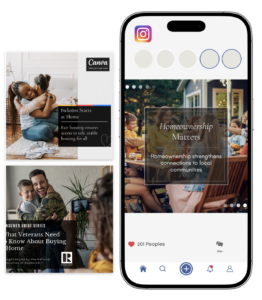
Social media support built for
REALTOR® associations

Stand Out.

Stand Out.

Stay consistent and visible without the stress

Stay consistent and visible without the stress

Let's Get You Set Up

Just a few quick steps and we’ll take it from there.

Our process is simple. Following is a quick overview before you get started to help you understand what happens next.

  1. Step 1: Fill out our form (on the right). 
  2. Step 2: Within 2-3 days, you will receive a notification in your Meta (Facebook) account, requesting access to your page from Brown Dog Communications. Once you approve access, we will be connected.
  3. Step 3: Your curated posting will begin based on the package you purchased (3-5 times per week).


For additional help, please refer to our videos below.

Step 1

We need a little information. Please fill out this form to get started.

Primary Contact Name
On a Computer:

Log into Facebook
Go to your association’s Facebook Page
Look at the address bar at the top of your browser
Copy the full link (it will look something like: facebook.com/YourPageName)
Is Your Facebook Page a Business Page?

Step 2

Grant Brown Dog access to your Facebook page.

  1. Login to your board/association Facebook page. 
  2. From the left menu, click Settings.
  3. Now, click Page Setup in the left menu.
  4. You will see a new section on the right of your dashboard. click Page Access and then click Next
  5. Click Review request
  6. Once you’ve verified the request, click Next
  7. Please make sure we have full access to your account. Then click Accept. You may need to re-enter your Facebook profile password first.

Note: If you use Meta Business Suite, you can approve access by following these steps:

  1. Go to Settings in the left menu to open new page
  2. In the left menu you will see Requests. Click on Other requests to local our access request.
  3. Click Approve.

Instructions from Facebook: https://www.facebook.com/business/help/619744345300739

COMING SOON!!!

Monthly Social Content Kit

You post using our ready-to-use graphics

Get a set of professionally designed graphics each month to keep your messaging timely, relevant, and easy to share.

  • 12 social media graphics each month
  • Mix of education, consumer, advocacy, community, member value, and more
  • Delivered as editable Canva templates or ready-to-use PNGs
  • Built around timely monthly events (Fair Housing Month, Homeownership Month, REALTOR® Safety, etc.)


Best for associations that want flexibility with ready-to-use content

Be the first to know!

Be the first to know when we launch our Monthly Social Content Kits. Simple, ready-to-use Canva templates designed for REALTOR® associations!

Primary Contact Name
On a Computer:

Log into Facebook
Go to your association’s Facebook Page
Look at the address bar at the top of your browser
Copy the full link (it will look something like: facebook.com/YourPageName)
Is Your Facebook Page a Business Page?

Copyright 2026 © Brown Dog Communications | All Rights Reserved